WhatsApp Metadata Analysis
Table of Contents
Have you ever wondered what data your device is actually sending to WhatsApp’s servers? I did and looked up some resources online, but I was not entirely satisfied. So, I built a system that captures all my client-to-server traffic from WhatsApp Web and organized it into a structured overview (see the last section of the post).

Image credit: Public Domain Image Archive
GÖD’S GATE
Run it yourself?
If you want to capture the data your own WhatsApp client sends and receives, you can follow this GitHub repo. The key script is test-whatsapp-metadata.js.
Donations?
You can also toss me a coin: Paypal
Introduction: Qualitative Review of WhatsApp’s metadata
The goal of this roject was not only to collect traffic but also to identify which components are protected by end-to-end encryption (E2EE) and which are not. That way, I could reliably distinguish what WhatsApp’s servers can read, and what they never see in plaintext.
A key challenge lies in the layered nature of the encryption. WhatsApp Web communicates using secure WebSockets (wss://) over TLS. Tools such as Wireshark can remove TLS and unmask WebSocket frames (masking in this case is an XOR operation applied to the bits to avoid), but I learned that the underlying payload remains encrypted. This suggests that WhatsApp applies additional application-layer encryption to metadata in addition to Signal-based E2EE of the message content. Evidence of this layering appears clearly in this screenshot:

The frame is unmasked—you can read the initial “WA”—but the rest of the payload is still unreadable (encrypted). This likely represents another encryption layer applied by WhatsApp, which is a sensible security measure.
Inspecting libsignal, Signal’s open-source E2EE library, does not reveal which fields WhatsApp encrypts. The library is a tool, not a policy. Moreover, even though Meta licenses libsignal, WhatsApp does not use the reference implementation directly. Instead, they rely on proprietary libraries that build on top of libsignal and these are not open-source. As a result, only WhatsApp can tell us what’s end-to-end encrypted—and they do (see below).
What Is Encrypted?
Based on WhatsApp’s public documentation: message content—including text, media, voice messages, documents, live location, status updates, and calls—is fully end-to-end encrypted. This means Meta cannot access this content in plaintext once it leaves the sender’s device.
What Metadata Is Not Encrypted?
Metadata = “data about data”
While WhatsApp uses end-to-end encryption (E2EE) for message content, they still collect metadata about your communications.
Metadata necessary for routing and service operation is not E2EE-protected. This typically includes (among others):
- Phone numbers
- Message timestamps
- Frequency and volume of communication
- Device information
- IP address
- Sender and recipient (internal) identifiers
- Group membership information
- Profile data
- Non-E2EE backups
- Payment transaction data (in regions where payments are supported)
This list aligns with independent analyses such as those from Wire, a messaging platform that also implements E2EE (via MLS, an alternative to Signal that scales better for group chats). Wire similarly notes that backups are not end-to-end encrypted.
Online I read debate about two contentious data points though: user location and URLs sent in a message. Can Meta servers read them? I investigated further.
Location
Regarding location, in WhatsApp’s website it reads: “When end-to-end encrypted, your messages, photos, videos, voice messages, documents, live location, status updates, and calls are secured from falling into the wrong hands.”.
However, Signal’s president, Whittaker, in this article, asserts that “WhatsApp licenses Signal’s end-to-end encryption technology. Nevertheless, a lot of personal and intimate information isn’t protected. […] According to Signal’s president, this involves users’ location data, contact lists, when they send someone a message, when they stop, what users are in their group chats, their profile picture, and much more.”
So there are different possibilities to interpret her words:
- Since WhatsApp indicates that locaton is E2EE, Whittaker may have expressed the point too broadly.
- Whittaker refers to location derived from IP, which WhatsApp acknowledges using primarily for spam detection see a talk from M. Jones, a SW Engineer at WhatsApp that led the anti-spam effort after E2EE was enabled. Signal uses other methods to prevent spam, see this Signal post.
- Whittaker really refers to GPS location when we share it in a WhatsApp message. However, WhatsApp states clearly in their website that “live location” is not shared. But perhaps static location is shared with WhatsApp servers.
Wire’s analysis provides an additional signal: it explicitly lists location sharing among the types of content protected by E2EE, and omits location from its enumeration of metadata accessible to WhatsApp servers. Given that Wire competes with WhatsApp, this omission is notable—if they believed location was exposed, they would likely point it out.
Based on the available evidence, the most consistent interpretation of Whittaker’s words is (2): the “location data” referenced is IP-based, not GPS location shared in chats.
URLs
Link previews offer useful insight into URL handling. Evidence suggests that WhatsApp clients, not WhatsApp servers, fetch preview data from third-party servers hosting the website. See this Stack Exchange analysis.
- The client requests the URL directly.
- The target server therefore receives the user’s IP.
WhatsApp provides an option to disable link previews, explicitly describing this as a privacy measure to protect the user’s IP address: “As an advanced security measure, you can turn on Disable link previews. If you turn on Disable link previews, the links you send to others won’t generate a link preview. This is an optional layer of security to protect your IP address”.
Additional security writeups and discussions (e.g., TheHackerNews, Hacker News threads) explain that receiving a URL—even without clicking it—can expose the recipient’s IP through preview generation.
A practical tip: Another reason to add a space after a URL is to prevent any appended text from being interpreted as part of the link, which would cause a third-party server to fetch it and potentially expose unintended message content.
Overall, URLs appear to be end-to-end encrypted. The server cannot read them unless the link points to a Meta-owned domain and Meta correlates timestamps across services—something for which no evidence has been presented. WhatsApp states that data shared with Facebook is limited to operational areas such as spam detection, not advertising (see this Wired article—note that’s the magazine, not the messaging app).
This concludes the qualitative overview. The next sections of the post shows how I captured WhatsApp Web traffic and what the decrypted (post-TLS and post-masking) payload looks like. While this does not reveal which fields are E2EE-protected internally, it provides a complete unencrypted view of the data exchanged between the client and WhatsApp’s servers.
Analysis with Wireshark - Removing TLS encryption
After removing the TLS layer, performing a man-in-the-middle attack on myself, this is what I could see, and hence Meta servers are guaranteed to see.
🔴 Without any decryption
Connection Metadata:
- WebSocket connection establishment to
web.whatsapp.com - Connection timing (when you connect/disconnect)
- Server IP addresses
- WebSocket connection establishment to
Network Routing:
- Your IP address
- TCP/TLS handshake metadata
🔴 After TLS Decryption:
Device Information (HTTP Headers):
- User-Agent string (OS version, browser version)
- Browser capabilities (WebSocket support, compression)
- Language preference
Session Data (HTTP Headers):
- Session cookies (
wa_ul,wa_web_lang_pref) - Authentication tokens
- Session cookies (
WebSocket Connection Data
- The contents of the WebSocket handshake and all messages sent back and forth after it’s established. But the WebSocket payload was encrypted, see image in the introduction (and example below).
HTTP WebSocket Handshake (decrypted):
GET /ws/chat HTTP/1.1
Host: web.whatsapp.com
User-Agent: Mozilla/5.0 (Macintosh; Intel Mac OS X 10_14_0) ...
Cookie: wa_ul=77d37bf9-2948-47de-8dfc-3d5e4fafb884
👆 Visible to servers - only connection metadata
WebSocket Binary Payload (after TLS decryption):
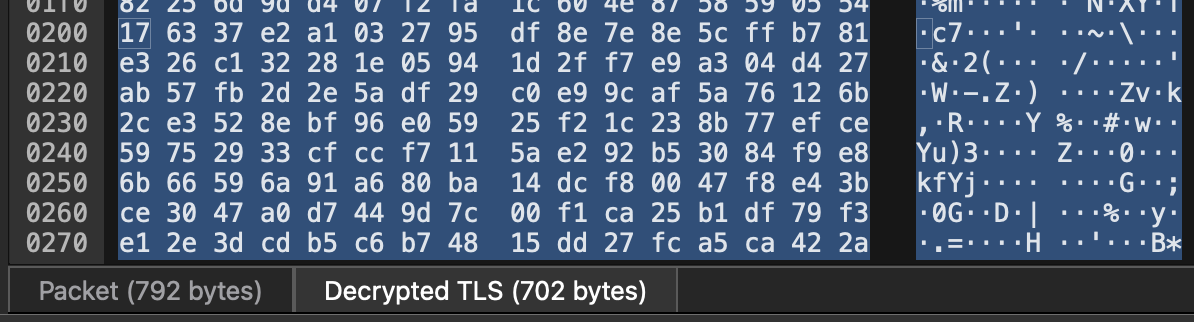
👆 Still encrypted - contains message content AND metadata
🟢 What Remains Encrypted (Even After TLS Decryption):
Message Content: Text, media, documents, voice notes.
Message Metadata:
- Phone numbers (sender, recipient)
- Message IDs
- Timestamps (when message was sent)
- Contact information
- Group membership
- Reaction data
- Reply/forward metadata
- All fields captured by
test-whatsapp-metadata.js
Test Script Walkthrough: What Data Points Are Visible and Where
This section walks through the metadata collection test script (test-whatsapp-metadata.js), and based on the qualitative investigation I did at the top of the post, what data is collected and where it’s processed (Meta’s servers vs. your device).
Running the Metadata Inspector
After setting up your WhatsApp Web client, test exactly what metadata is captured:
node test-whatsapp-metadata.js
Then send yourself different types of messages to see the output.
Decrypting the full payload on the client side
After examining the payload following TLS decryption, I then focused on enumerating all data exchanged by WhatsApp clients. While this method cannot determine which specific fields are protected by E2EE (a rooted device might allow deeper inspection), it does reveal the full set of data transmitted between client and server. Note that some of these data points are visible to Meta, while others—such as the content types discussed earlier—are protected by end-to-end encryption. Thus, the following is an informed assessment of what could and could not be seen by Meta.
Legend for this walkthrough:
- 🔴 SERVER-SIDE: Meta’s servers have direct access to this data
- 🟡 CALCULATED SERVER-SIDE: Meta could calculate/infer this from server logs
- 🟢 CLIENT-SIDE ONLY: Only visible on your device (E2E encrypted or local-only)
Metadata visible to Meta (based on the qualitative investigation)
This section corresponds to what Meta’s servers could potentially see, log, and analyze.
The test script uses the message_create event, which captures every message (incoming and outgoing).
The event produces a message object: “msg”, which has a series of properties that I can inspect.
Communication Patterns
Phone Numbers 🔴 SERVER-SIDE
msg.from.split('@')[0]  // Your phone number
msg.to.split('@')[0]    // Contact's phone number
- How Meta could get it: Every message packet includes sender/recipient IDs in routing headers
- Format:
1234567890@c.us(personal) or123-456@g.usor123-456@lid(groups) - Privacy impact: Can map your entire social graph (who talks to whom)
Timestamps 🔴 SERVER-SIDE
new Date(msg.timestamp * 1000).toISOString()
- How Meta could get it: Message creation timestamp in every packet header
- Precision: Down to the second
- Privacy impact: Can build behavioral profiles (sleep schedule, work hours, activity patterns)
Message Volume 🟡 CALCULATED SERVER-SIDE
const messageCount = allMessages.length;
- How Meta could track it: Server logs accumulate total message count per conversation
- Privacy impact: Shows conversation depth over time
- What the script does: Fetches all messages to demonstrate total count
Communication Frequency 🟡 CALCULATED SERVER-SIDE
How I could calculate it:
const chat = await msg.getChat();
const allMessages = await chat.fetchMessages({ limit: 99999 });
...
const avgPerDay = (messageCount / daysDiff).toFixed(2);
- How Meta could calculate:
- Logs all message timestamps server-side
- Calculates:
total_messages / days_between_first_and_last
- Privacy impact: Identifies relationship intensity (high frequency = close friend)
- What the script does: Demonstrates this calculation by fetching history and computing average
Group Memberships 🔴 SERVER-SIDE (for groups only)
if (isGroup) {
  chat.name                  // Group name
  chat.id._serialized       // Group ID
  chat.participants.length  // Member count
}
- How Meta could get it: Server maintains group membership tables for routing
- Privacy impact: Can build interest graphs (political groups, hobby groups, etc.)
Group Lifecycle Events 🔴 SERVER-SIDE (for groups only)
chat.createdAt // Group creation timestamp
- How Meta could get it: Server records all group create/delete/join/leave events
- Privacy impact: Tracks group dynamics over time
Device Information
Device Type 🔴 SERVER-SIDE
msg.deviceType // "android", "ios", "web"
- How Meta coudl get it: Message packets include device type identifier
- Note: This shows the primary device (usually phone), not linked devices
- Privacy impact: Device fingerprinting
Operating System (User-Agent) 🔴 SERVER-SIDE
await getOSInfo() // Extracts from User-Agent string <- this is simulated on my script. WhatsApp's web server gets it from the HTTP header
- How Meta could get it: HTTP “User-Agent” header in every request
- Example: “Mozilla/5.0 (Windows NT 10.0) Chrome/120.0.0.0”
- Privacy impact: Detailed OS version reveals device fingerprint
WhatsApp Version 🔴 SERVER-SIDE
await getWhatsAppVersion() // From window.Debug.VERSION
- How Meta could get it: Client sends version in connection handshake
- Privacy impact: Used for forced updates, compatibility checks
Device ID (WhatsApp ID) 🔴 SERVER-SIDE
info.wid._serialized // e.g., "1234567890@c.us"
- How Meta could get it: Assigned during registration, permanent identifier
- Privacy impact: Links all your activity together across sessions
IP Address 🔴 SERVER-SIDE (automatic)
const ipInfo = await getPublicIP();  //  script uses ipapi.co for **demo**
log(`Your IP address: ${ipInfo.ip}`);
- How Meta could get it:
- Automatic - every TCP/IP connection includes source IP in packet headers
- No special code needed - built into internet protocol
- Server logs automatically record connecting IP
- What the script does: Calls ipapi.co API to demonstrate what info can be derived
- Privacy impact:
- Approximate location (city-level accuracy)
- ISP identification
- Track network changes (WiFi → cellular)
- Used for spam filtering
However, WhatsApp is very explicit that they only use IPs for spam detection.
Geographic Location 🟡 CALCULATED SERVER-SIDE (from IP)
log(`Location: ${ipInfo.city}, ${ipInfo.region}, ${ipInfo.country}`); // script uses ipapi.co for **demo**
- How could location be calculated:
- IP address → GeoIP database lookup (MaxMind, IP2Location, etc.) This one is free.
- These databases map IP ranges to physical locations
- Accuracy: typically city-level, sometimes neighborhood
- Our script does: Uses ipapi.co to demonstrate geolocation lookup
- Privacy impact: If missued.
- Track where you are when messaging
- Build travel patterns
- Identify home/work locations (frequent IPs)
ISP/Network Operator 🟡 CALCULATED SERVER-SIDE (from IP)
log(`ISP/Network: ${ipInfo.org || 'Unknown'}`); // script uses ipapi.co for **demo**
- How could ISP be determined:
- IP WHOIS lookup (public information)
- Organization that owns the IP block
- What the script does: Uses ipapi.co to show ISP info
- Privacy impact:
- Reveals which network (home ISP vs mobile vs WiFi)
- Corporate WiFi could reveal employer
- Public WiFi reveals venue (coffee shop, airport)
Full disclosure: I could not make this one work, even when I was sending WhatsApp messages with ISP data, not wifi. I haven’t been able to debug yet.
Language Settings 🔴 SERVER-SIDE
Intl.DateTimeFormat().resolvedOptions().locale // This one is for demo purposes
- How Meta could get it:
- HTTP “Accept-Language” header (automatic with every request)
- Example:
Accept-Language: en-US,en;q=0.9,es;q=0.8
- Our script does: Reads browser locale to demonstrate
- Privacy impact: Language/culture preferences, user fingerprinting
Timezone 🟡 CALCULATED SERVER-SIDE
Intl.DateTimeFormat().resolvedOptions().timeZone // **demo**
- How could timezone be determined:
- Can infer from message timestamps vs server time
- What the script does: Reads browser timezone to demonstrate
- Privacy impact:
- Another location indicator (potentially narrows down where you are)
- Reveals travel (timezone changes)
Account Activity
Last Seen Timestamp 🔴 SERVER-SIDE
new Date(msg.timestamp * 1000).toISOString()
- How Meta could observe: From message timestamps
- Privacy impact: Activity patterns
Online/Offline Status 🔴 SERVER-SIDE
// Not in message object, but Meta could track via WebSocket connections
- How Meta could track:
- WebSocket connection = online
- Disconnection = offline
- Server logs connection/disconnection timestamps
- Proof: WhatsApp shows “online” indicator to other users
- Privacy impact: Session duration, online patterns, most active hours
Profile Picture URL 🔴 SERVER-SIDE
const profilePicUrl = await contact.getProfilePicUrl();
- How Meta could access it:
- All profile pictures hosted on Meta’s Content Delivery Network (pps.whatsapp.net)
- Returns
nullif privacy settings hide it
- Privacy impact: Meta could track profile picture changes, metadata from uploads
Linked Devices 🔴 SERVER-SIDE (
// Not in message API, but proven by "Linked Devices" in WhatsApp's UI
WhatsApp Settings shows “Linked Devices” list. It shows device names, types, “Last active” time.
- What could be tracked:
- Number of linked devices
- Device types (Web, Desktop, Portal)
- Link timestamps
- Last active time per device
- Privacy impact: Full device ecosystem visibility
Message Metadata (NOT content)
Message ID 🔴 SERVER-SIDE
msg.id._serialized
- Format:
"true_1234567890@c.us_3EB0C8F4E2D5A1B6C3D4E5F6" - Components:
true/false: direction (sent/received)- Phone ID: participant
- Random string: unique identifier
- Privacy impact: Every message permanently tracked for delivery, deletion logging
Timestamps (Sent/Delivered/Read) 🔴 SERVER-SIDE
msg.timestamp  // When sent
msg.ack        // Delivery status (0-4)
- How Meta could track: Server logs each stage of message pipeline
- Ack values:
- 0: Sent from device
- 1: Delivered to server
- 2: Delivered to recipient
- 3: Read by recipient
- 4: Played (voice/video)
- Privacy impact: Complete delivery pipeline visibility, read receipts
Delivery Status 🔴 SERVER-SIDE
getAckStatus(msg.ack)
- How Meta could track: Server maintains delivery state for each message
- Privacy impact: Knows when recipient reads your message
Forward Count 🔴 SERVER-SIDE
msg.isForwarded          // boolean
msg.forwardingScore      // times forwarded
- How Meta could track: Server increments counter each time message is forwarded
- Privacy impact:
- Track viral content
- Identify misinformation/spam
- Enforce forwarding limits (5 chats at once)
Media Type 🔴 SERVER-SIDE
msg.type  // "chat", "image", "video", "audio", "ptt", "document", etc.
msg.hasMedia
- How Meta could get it: Message type in packet header
- Privacy impact:
- Know you sent media (but not content)
- Compression decisions
File Size 🔴 SERVER-SIDE (approximate)
if (msg.hasMedia) {
  const media = await msg.downloadMedia();
  const sizeKB = Math.round(media.data.length * 0.75 / 1024);
}
- How Meta could get it: Encrypted file size when uploaded to CDN
- Our script does: Downloads and calculates size from base64 length
- Privacy impact:
- Storage tracking
- File size hints at content type (large = video, small = photo)
Call Metadata
Call Detection 🔴 SERVER-SIDE
if (msg.type === 'call_log') {
  // Call metadata
}
- What Meta could log:
- Caller/callee IDs
- Call timestamps (start/end)
- Call duration
- Call type (voice/video)
- Missed/declined/canceled status
- Note: Call AUDIO/VIDEO is E2E encrypted, but METADATA is not
- Privacy impact:
- Who you call and how often
- Call patterns
- Voice vs video preference
Group-Specific Metadata (for group chats)
Group Identification 🔴 SERVER-SIDE
chat.id._serialized  // Permanent group ID
chat.name            // Group name (can change)
- How Meta could track: Server maintains group registry
- Privacy impact: Group affiliations visible
Participant List 🔴 SERVER-SIDE
chat.participants.length              // Member count
chat.participants.filter(p => p.isAdmin)  // Admin list
- How Meta could access: Server maintains membership table for message routing
- Privacy impact:
- Social graph within groups
- Group size reveals nature (small = private, large = public)
- Admin identification
Message Author (in groups) 🔴 SERVER-SIDE
msg.author || msg.from // Who sent this message in the group
- How Meta could track: Message packets include author ID
- Privacy impact:
- Meta knows who says what in groups
- Can analyze: most active members, influence patterns
Mentions 🔴 SERVER-SIDE
msg.mentionedIds // Array of @mentioned user IDs
- How Meta could track: Mention metadata in message packet
- Privacy impact:
- Social connections within groups
- Frequent mentions = close relationships
- Mention patterns reveal subgroups/cliques
Data not visible to Meta (E2EE)
This section shows data protected by E2E encryption (Signal Protocol), which has been informed by the qualitative assessment.
🔐 Message Content (E2E Encrypted)
Message Text 🟢 CLIENT-SIDE ONLY
msg.body // The actual text content
- Why we can see it: We’re the recipient; our client has the decryption key
- Why Meta can’t see it:
- Servers only see encrypted ciphertext
- Decryption key never leaves your device
- Signal Protocol prevents server decryption
- What Meta sees:
"A8f3kJ9sP2mX7qL..."(base64-encoded ciphertext)
Message Length 🟢 CLIENT-SIDE ONLY
msg.body.length // Character count of DECRYPTED text
- What we see: Actual character count (e.g., 50 characters)
- What Meta sees: Encrypted payload size in BYTES, not character count
- Important:
- Encryption adds padding, so bytes ≠ character count
- Example: “Hi” (2 chars) might be 256 bytes encrypted
- Meta CANNOT determine exact character count from encrypted size
Media Content 🟢 CLIENT-SIDE ONLY
if (msg.hasMedia) {
  const media = await msg.downloadMedia();
  // media.mimetype, media.filename, media.data
}
- How it works:
- Media encrypted on sender’s device
- Encrypted file uploaded to WhatsApp CDN
- Encryption key sent in E2E encrypted message
- Recipient downloads encrypted file
- Recipient decrypts using key
- What Meta sees:
- Encrypted file blob (gibberish)
- File size, mime type, timestamps
- What Meta CAN’T see:
- Actual image/video content.
- Text in documents
- Audio in voice messages
Voice Messages 🟢 CLIENT-SIDE ONLY
if (msg.type === 'ptt' || msg.type === 'audio') {
  // Voice message audio is E2E encrypted
}
- Meta cannot transcribe or listen
- No server-side speech recognition
- Can’t be used for voice fingerprinting
Quoted Message Content 🟢 CLIENT-SIDE ONLY
if (msg.hasQuotedMsg) {
  const quoted = await msg.getQuotedMessage();
  quoted.body  // Encrypted
}
Payload sent to WhatsApp servers
💡 WHAT THE BELOW JSON SHOWS: ✅ COMPLETE message object (all properties) ✅ COMPLETE chat object (all properties) ✅ Internal _data structures (raw protocol data) ✅ This is what WhatsApp Web servers receive from the client. Some of it will be E2EE, as discussed above, and others will be in plain text to Meta’s servers.
I had ChatGPT give a definition for each of the data points.
═══════════════════════════════════════════════════════════════ MESSAGE OBJECT (msg): ═══════════════════════════════════════════════════════════════
| Key | Example (Anonymized Value) | Description |
|---|---|---|
_data.id.fromMe | true | Indicates if the message was sent by the current user. |
_data.id.remote | group_847263@g.us | Group identifier (the chat’s unique WhatsApp JID). |
_data.id.id | MSG_ABC123XYZ789 | Unique message identifier generated by WhatsApp. |
_data.id.participant | user_5550001234@lid | The participant’s WhatsApp ID within the group. |
_data.id._serialized | true_group_847263@g.us_MSG_ABC123XYZ789_user_5550001234@lid | Serialized string combining sender, group, and message IDs. |
_data.viewed | false | Whether the message has been viewed by the user. |
_data.body | "Test group message" | Message content. |
_data.type | "chat" | Type of message (chat, image, video, etc.). |
_data.t | 1762705578 | Unix timestamp when the message was created. |
_data.clientReceivedTsMillis | 1762705577584 | Timestamp when client received the message. |
_data.notifyName | "Alex Doe" | Display name of the sender. |
_data.from | "user_5550001234@lid" | Sender’s WhatsApp ID. |
_data.to | "group_847263@g.us" | Recipient group’s ID. |
_data.author | "user_5550001234@lid" | Author of the message in group context. |
_data.ack | 1 | Acknowledgement state (1 = delivered to server). |
_data.isNewMsg | true | Whether the message is newly received. |
_data.viewMode | "VISIBLE" | Whether message is visible to the user. |
_data.messageSecret | { "0": 228, "1": 255, ... } | Internal encryption metadata for message authentication. |
_data.productHeaderImageRejected | false | Flag for business message media validation. |
_data.links | [] | List of detected URLs in message (if any). |
invis | false | Indicates whether the message is invisible in the chat (e.g., background system messages). |
isNewMsg | true | Marks the message as newly received by the client. |
star | false | Whether the message has been starred/bookmarked by the user. |
kicNotified | false | Internal flag used when key integrity checks trigger notifications. |
recvFresh | true | Denotes that the message was freshly received rather than restored from backup or cache. |
isFromTemplate | false | Indicates if the message originated from a pre-defined template (used in business messaging). |
isAdsMedia | false | Shows whether this message carries advertising media content. |
pollInvalidated | false | True if a poll message became invalid (e.g., after an edit or deletion). |
isSentCagPollCreation | false | Flag marking a “Create-A-Group poll” message type. |
latestEditMsgKey | null | If message was edited, stores the message key of the last edit. |
latestEditSenderTimestampMs | null | Timestamp in milliseconds of the last message edit. |
mentionedJidList | [] | List of user IDs mentioned in the message. Empty here. |
groupMentions | [] | Mentions of entire groups (if group tags like @everyone were used). |
isEventCanceled | false | Used in event-type messages to denote cancellation. |
eventInvalidated | false | Internal invalidation flag for event messages. |
isVcardOverMmsDocument | false | Indicates if a contact card (vCard) was sent as an MMS-style document. |
isForwarded | false | True if the message was forwarded from another chat. |
isQuestion | false | Marks messages that represent user questions in interactive features. |
questionReplyQuotedMessage | null | If replying to a question, this references the quoted question message. |
questionResponsesCount | 0 | Count of responses received for a question-type message. |
readQuestionResponsesCount | 0 | Count of question responses that have been read by the sender. |
hasReaction | false | Indicates whether someone reacted (emoji reaction) to this message. |
viewMode | "VISIBLE" | Specifies visibility state (e.g., VISIBLE, HIDDEN, ARCHIVED). |
messageSecret | { "0": 228, "1": 255, ... "31": 168 } | 32-byte array containing encryption/authentication key fragments for message verification. |
productHeaderImageRejected | false | Used for business messages — shows if a product header image was rejected by validation. |
lastPlaybackProgress | 0 | Tracks progress for audio/video message playback. |
isDynamicReplyButtonsMsg | false | Indicates if message includes interactive reply buttons. |
isCarouselCard | false | Marks a business-style carousel message (multi-card layout). |
parentMsgId | null | References the parent message in threads/replies. |
callSilenceReason | null | Describes why a call was silenced (if message relates to a call). |
isVideoCall | false | Marks if the message relates to a video call event. |
callDuration | null | Duration of the call, if applicable. |
callCreator | null | WhatsApp ID of the user who initiated the call. |
callParticipants | null | List of participants involved in a call message. |
isCallLink | null | Marks if message represents a call link invite. |
callLinkToken | null | Unique token for a generated call link. |
isMdHistoryMsg | false | Used internally for message synchronization history events. |
stickerSentTs | 0 | Timestamp for sticker-sent messages. |
isAvatar | false | True if the message involves an avatar (custom emoji or profile sticker). |
lastUpdateFromServerTs | 0 | Timestamp of the last server update for this message. |
invokedBotWid | null | ID of the bot invoked, if message triggered a bot response. |
bizBotType | null | Type/category of business bot (if used). |
botResponseTargetId | null | Message ID to which the bot is responding. |
botPluginType | null | Plugin type used by the bot for message automation. |
botPluginReferenceIndex | null | Numeric reference to plugin action performed by the bot. |
botPluginSearchProvider | null | Provider used for in-message search (e.g., Yelp, Google). |
botPluginSearchUrl | null | URL used by the bot for query-based responses. |
botPluginSearchQuery | null | Query string the bot executed. |
botPluginMaybeParent | false | Indicates if this bot message is a parent in a thread chain. |
botReelPluginThumbnailCdnUrl | null | CDN link to a thumbnail image for bot reel messages. |
botMessageDisclaimerText | null | Disclaimer text appended to bot messages. |
botMsgBodyType | null | Type of bot message body (e.g., text, card, media). |
reportingTokenInfo | null | Token info used for abuse/spam reporting flow. |
requiresDirectConnection | null | If true, indicates message required direct socket transmission. |
bizContentPlaceholderType | null | Placeholder type for business content templates. |
hostedBizEncStateMismatch | false | Indicates encryption mismatch in business message hosting. |
senderOrRecipientAccountTypeHosted | false | Marks if sender/recipient is a hosted business account. |
placeholderCreatedWhenAccountIsHosted | false | True if placeholder was created due to hosted account sync. |
groupHistoryBundleMessageKey | null | Key reference for message bundles in group history. |
groupHistoryBundleMetadata | null | Additional metadata about bundled messages. |
links | [] | List of hyperlinks found in message text, if any. |
═══════════════════════════════════════════════════════════════ CHAT OBJECT (chat): ═══════════════════════════════════════════════════════════════
chat ├── groupMetadata ├── id ├── name ├── lastMessage │ ├── _data (raw message payload) │ └── normalized message object (shown above) └── client (active WhatsApp session reference)
Group Metadata
| Key | Example (Anonymized Value) | Description |
|---|---|---|
groupMetadata.id.server | "g.us" | Identifies the type of chat — "g.us" denotes a WhatsApp group. |
groupMetadata.id.user | "120300000000001" | The numeric group identifier assigned by WhatsApp. |
groupMetadata.id._serialized | "120300000000001@g.us" | Combined string representing the group’s unique JID (Jabber ID). |
groupMetadata.creation | 1762616768 | Timestamp representing when the group was created (UNIX epoch time). |
groupMetadata.owner.server | "lid" | Server domain for the group owner (typically linked device or business). |
groupMetadata.owner.user | "17310000000000" | Owner’s WhatsApp user ID. |
groupMetadata.owner._serialized | "17310000000000@lid" | Full JID of the group’s owner. |
groupMetadata.subject | "Stellar Gateway" | The group’s display name. |
groupMetadata.subjectTime | 1762616778 | Timestamp when the group subject/title was last updated. |
groupMetadata.descTime | 0 | Timestamp for the group description update; 0 means no description set. |
groupMetadata.restrict | false | If true, only admins can send messages. |
groupMetadata.announce | false | If true, only admins can post announcements. |
groupMetadata.noFrequentlyForwarded | false | If true, restricts forwarding messages often flagged as “frequently forwarded.” |
groupMetadata.ephemeralDuration | 0 | Message disappearing time (seconds); 0 disables ephemeral messages. |
groupMetadata.disappearingModeTrigger | "chat_settings" | Source that triggered the disappearing messages mode (e.g., manual settings). |
groupMetadata.disappearingModeInitiatedByMe | false | Indicates if the user initiated disappearing mode. |
groupMetadata.membershipApprovalMode | false | Whether new members require approval before joining. |
groupMetadata.memberAddMode | "all_member_add" | Defines who can add members (e.g., all members or admins only). |
groupMetadata.memberLinkMode | "admin_link" | Defines who can generate and share the invite link. |
groupMetadata.reportToAdminMode | false | Enables “report to admin” functionality if true. |
groupMetadata.size | 3 | Total number of current members. |
groupMetadata.support | false | True for official support or service groups (used by WhatsApp Business). |
groupMetadata.suspended | false | Marks the group as suspended by system moderation. |
groupMetadata.terminated | false | Marks the group as deleted/terminated by WhatsApp. |
groupMetadata.uniqueShortNameMap | {} | Mapping of unique short aliases (if the group has a short invite name). |
groupMetadata.isLidAddressingMode | true | Indicates usage of the new linked-device addressing mode. |
groupMetadata.isParentGroup | false | Marks a group as a parent in a community structure. |
groupMetadata.isParentGroupClosed | false | Indicates if a parent group is closed for new subgroups. |
groupMetadata.defaultSubgroup | false | Identifies if this is the default subgroup of a parent community. |
groupMetadata.generalSubgroup | false | Marks general-purpose subgroup in a community. |
groupMetadata.groupSafetyCheck | false | Used internally for WhatsApp’s group integrity verification. |
groupMetadata.generalChatAutoAddDisabled | false | If true, disables auto-adding members to the group. |
groupMetadata.allowNonAdminSubGroupCreation | false | Controls whether non-admins can create subgroups. |
groupMetadata.lastActivityTimestamp | 0 | Tracks last message or update activity timestamp. |
groupMetadata.lastSeenActivityTimestamp | 0 | Timestamp when group activity was last observed by the client. |
groupMetadata.incognito | false | Marks the group as hidden or stealth (for privacy testing). |
groupMetadata.hasCapi | false | Indicates whether the group has Cloud API integration (for business use). |
Participant List
| Participant (Anonymized) | Admin | Super Admin | Description |
|---|---|---|---|
user_490000000001@c.us | false | false | Regular member of the group. |
user_320000000002@c.us | true | true | Primary admin or group creator. |
user_320000000003@c.us | false | false | Regular participant. |
Additional Group Metadata
| Key | Example (Anonymized Value) | Description |
|---|---|---|
pendingParticipants | [] | List of users awaiting approval to join the group. |
pastParticipants | [] | Users who have left or been removed from the group. |
membershipApprovalRequests | [] | Pending membership requests for approval-required groups. |
subgroupSuggestions | [] | Suggested subgroups under a community umbrella. |
Chat ID Block
| Key | Example (Anonymized Value) | Description |
|---|---|---|
id.server | "g.us" | Server suffix for group chats. |
id.user | "120300000000001" | Group’s unique numerical identifier. |
id._serialized | "120300000000001@g.us" | Combined JID string identifying the chat. |
Chat-Level Properties
| Key | Example (Anonymized Value) | Description |
|---|---|---|
name | "Stellar Gate" | The display name of the chat or group. |
isGroup | true | Confirms that the chat type is a group conversation (false would mean private chat). |
isReadOnly | false | If true, the current user cannot send messages (e.g., view-only or announcement group). |
unreadCount | 0 | The number of unread messages in this chat. |
timestamp | 1762634551 | Last activity timestamp in UNIX format (seconds). |
archived | false | Whether the chat is archived in the WhatsApp UI. |
pinned | false | Indicates whether the chat is pinned to the top of the chat list. |
isMuted | false | Whether notifications for this chat are muted. |
muteExpiration | 0 | If muted, this holds the mute expiration time (0 means not muted). |
lastMessage._data — Message Metadata Breakdown
| Key | Example (Anonymized Value) | Description |
|---|---|---|
id.fromMe | true | Indicates the message was sent by the current user. |
id.remote | "120300000000001@g.us" | JID (Jabber ID) of the group chat this message was sent to. |
id.id | "3A82CCB4F9B25A74BFBA" | The unique message identifier assigned by WhatsApp. |
id.participant._serialized | "17310000000000@lid" | Sender’s user ID within the group (Linked Device context). |
id._serialized | "true_120300000000001@g.us_3A82CCB4F9B25A74BFBA_17310000000000@lid" | A combined encoded message key used internally by WhatsApp. |
viewed | false | Message not yet viewed by the sender’s device. |
body | "TEST - Group message" | Actual text content of the message. |
type | "chat" | Message type — can be chat, image, video, audio, etc. |
t | 1762705578 | Message creation timestamp (UNIX). |
clientReceivedTsMillis | 1762705577584 | Timestamp (ms) when the client received confirmation. |
notifyName | "Alex M." | Display name of the sender (from their contact info or profile). |
from._serialized | "17310000000000@lid" | Sender’s JID (Linked Device format). |
to._serialized | "120300000000001@g.us" | Receiver’s JID (the group). |
author._serialized | "17310000000000@lid" | Author JID (in groups, identical to from). |
ack | 1 | Message delivery acknowledgment (0–4 scale: sent, delivered, read, etc.). |
invis | false | Internal visibility flag (used for hidden messages). |
isNewMsg | true | Marks the message as newly received or created. |
star | false | If true, this message has been starred by the user. |
kicNotified | false | Internal flag for “keep in chat” notification (used for disappearing messages). |
recvFresh | true | Marks message as freshly received from the server. |
isFromTemplate | false | Indicates whether message came from a pre-defined template (used in business chats). |
isAdsMedia | false | Identifies if message contains media linked to an ad. |
pollInvalidated | false | If a poll message was invalidated or retracted. |
isSentCagPollCreation | false | Internal flag for poll creation status. |
latestEditMsgKey | null | Reference to the most recent edited version (if message was edited). |
latestEditSenderTimestampMs | null | Timestamp of last edit made by the sender. |
mentionedJidList | [] | List of JIDs mentioned in this message (@mentions). |
groupMentions | [] | List of group mentions (e.g., @everyone). |
isEventCanceled | false | Used for event-based messages (e.g., group call, poll event) that got canceled. |
eventInvalidated | false | Marks an event as invalidated. |
isVcardOverMmsDocument | false | True if the message includes a vCard file shared over MMS. |
isForwarded | false | Indicates if the message has been forwarded. |
isQuestion | false | Marks if this is an interactive question-type message. |
questionReplyQuotedMessage | null | Holds quoted question data (if replying to one). |
questionResponsesCount | 0 | Number of responses to this question-type message. |
readQuestionResponsesCount | 0 | Number of responses viewed by the current user. |
hasReaction | false | Indicates if the message has emoji reactions attached. |
viewMode | "VISIBLE" | Whether message is visible to the user. |
messageSecret (Encryption Metadata)
{ “0”: 228, “1”: 255, “2”: 255, …, “31”: 168 }
Extended Metadata Flags
| Key | Example | Meaning |
|---|---|---|
productHeaderImageRejected | false | For business/media messages, indicates if product header image failed validation. |
lastPlaybackProgress | 0 | Tracks audio/video playback progress. |
isDynamicReplyButtonsMsg | false | True for messages containing interactive quick-reply buttons. |
isCarouselCard | false | Marks media cards (used in business catalog messages). |
parentMsgId | null | Reference to a parent message (for replies). |
isVideoCall | false | Indicates if this message represents a video call record. |
callDuration | null | Duration of a call, if message is a call log. |
isMdHistoryMsg | false | Marks messages synchronized from multi-device message history. |
isAvatar | false | Used when message includes an avatar sticker. |
invokedBotWid | null | Bot identifier, if message triggers an automated bot response. |
botPluginType | null | Identifies a bot plugin type, if applicable. |
requiresDirectConnection | false | Whether message delivery requires direct peer connection (e.g., call setup). |
hostedBizEncStateMismatch | false | Internal flag for business encryption mismatches. |
senderOrRecipientAccountTypeHosted | false | True if either side uses a hosted WhatsApp Business account. |
placeholderCreatedWhenAccountIsHosted | false | Whether placeholder messages were generated for hosted accounts. |
groupHistoryBundleMessageKey | null | Reference key for historical bundle sync. |
groupHistoryBundleMetadata | null | Metadata for history bundle messages. |
links | [] | Array of detected hyperlinks in message text. |
id.fromMe | true | Indicates that the message was sent by the current user. |
id.remote | "120300000000001@g.us" | The destination group JID (unique chat identifier). |
id.id | "3A82CCB4F9B25A74BFBA" | The unique WhatsApp message ID assigned to this message. |
id.participant._serialized | "17310000000000@lid" | Identifies the message sender (even inside group messages). |
id._serialized | "true_120300000000001@g.us_3A82CCB4F9B25A74BFBA_17310000000000@lid" | Full serialized message key combining sender, chat, and message ID. |
ack | 1 | Message acknowledgment status: • 0: pending• 1: delivered to server• 2: delivered to recipient• 3: read• 4: played (for audio/video). |
hasMedia | false | Indicates that this message contains no media (plain text only). |
body | "TEST - Group message" | The text content of the message. |
type | "chat" | Message type — "chat" for text, "image" for pictures, "audio", "video", "ptt", etc. |
timestamp | 1762705578 | Unix timestamp when message was created. |
from | "17310000000000@lid" | Sender’s WhatsApp ID. |
to | "120300000000001@g.us" | Receiver’s WhatsApp ID — in this case, the group JID. |
author | "17310000000000@lid" | In group chats, specifies the message’s author (often same as from). |
deviceType | "ios" | Indicates that the sender’s device was an iOS device. |
isForwarded | false | Message was not forwarded. |
forwardingScore | 0 | Internal metric showing how many times a message has been forwarded. |
isStatus | false | true when message belongs to a user’s status update. |
isStarred | false | Indicates whether message is starred/bookmarked by the user. |
fromMe | true | Confirms that this message was sent by the local account (duplicate of id.fromMe). |
hasQuotedMsg | false | Whether this message includes a quoted message reference (reply). |
hasReaction | false | Indicates presence of emoji reactions on this message. |
vCards | [] | Holds shared contact cards (vCards) — empty for this message. |
mentionedIds | [] | Array of JIDs mentioned using @username syntax. |
groupMentions | [] | Marks if @everyone or @admins tags were used. |
isGif | false | true if media is an animated GIF. |
links | [] | Parsed list of URLs found in message text. |
client | "[Client Reference - Omitted]" | Internal handle linking to the active WhatsApp Web client instance. |
═══════════════════════════════════════════════════════════════ RAW DATA STRUCTURE (_data property if available): ═══════════════════════════════════════════════════════════════
Identification
| Key | Example | Meaning |
|---|---|---|
id.fromMe | true | Message originated from the current user. |
id.remote | 120363420542871897@g.us | The chat JID the message belongs to (group address). |
id.id | 3A82CCB4F9B25A74BFBA | WhatsApp-generated unique message ID. |
id.participant | 17313482965086@lid | The sender within that group (Linked-Device format). |
id._serialized | true_120363420542871897@g.us_3A82CCB4F9B25A74BFBA_17313482965086@lid | Concatenated unique key combining sender, chat, and message ID. |
Delivery / Visibility
| Key | Example | Meaning |
|---|---|---|
viewed | false | Message hasn’t been viewed locally. |
ack | 1 | Delivery state (0 = queued → 4 = played). |
invis | false | Hidden/system message flag. |
isNewMsg | true | Treated as a new inbound/outbound message. |
recvFresh | true | Arrived recently from server. |
viewMode | VISIBLE | Display state for the UI. |
Content
| Key | Example | Meaning |
|---|---|---|
body | TEST - Group message | Actual text payload. |
type | chat | Message type (chat, image, video, etc.). |
notifyName | Gonzalo Munill Garrido | Display name of the sender. |
hasReaction | false | Whether reactions exist. |
links | [] | Detected URLs. |
Timestamps
| Key | Example | Meaning |
|---|---|---|
t | 1762705578 | Server-side message timestamp (s). |
clientReceivedTsMillis | 1762705577584 | Client-side receive time (ms). |
lastUpdateFromServerTs | 0 | Last server update tick (if any). |
Participants
| Key | Example | Meaning |
|---|---|---|
from | 17313482965086@lid | Sender’s JID. |
to | 120363420542871897@g.us | Receiver’s JID (group). |
author | 17313482965086@lid | Message author inside the group. |
mentionedJidList | [] | Individual mentions. |
groupMentions | [] | Group-wide mentions such as @everyone. |
Flags / State
| Key | Example | Meaning |
|---|---|---|
star | false | Starred by user. |
kicNotified | false | “Keep in Chat” notification handled. |
isFromTemplate | false | Sent via message template (business feature). |
isAdsMedia | false | Media originated from an advertisement. |
pollInvalidated | false | Poll data invalid. |
isSentCagPollCreation | false | Client-aggregated poll creation flag. |
isVcardOverMmsDocument | false | vCard file sent as MMS. |
isForwarded | false | Forwarded status. |
isQuestion | false | Interactive question flag. |
questionResponsesCount | 0 | Total responses if question. |
readQuestionResponsesCount | 0 | Responses read by user. |
isEventCanceled / eventInvalidated | false | Group event state flags. |
Security
| Key | Example | Meaning |
|---|---|---|
messageSecret | 32-byte map | Byte array used for integrity in E2E encryption metadata (not the key itself). |
hostedBizEncStateMismatch | false | Business-account encryption consistency flag. |
Media / Interaction
| Key | Example | Meaning |
|---|---|---|
productHeaderImageRejected | false | Business product image validation. |
lastPlaybackProgress | 0 | For audio/video progress. |
isDynamicReplyButtonsMsg | false | Has interactive reply buttons. |
isCarouselCard | false | Business carousel layout flag. |
stickerSentTs | 0 | Sticker-send timestamp. |
isAvatar | false | Avatar sticker indicator. |
Call / Bot / Business Extras
| Key | Example | Meaning |
|---|---|---|
isVideoCall | false | Message represents a video-call record. |
callDuration | null | Duration if call message. |
invokedBotWid | null | ID of invoked chatbot. |
bizBotType | null | Type of business bot. |
requiresDirectConnection | null | True if direct peer link required (e.g., call). |
senderOrRecipientAccountTypeHosted | false | Either side uses hosted business account. |
Thread / History / Placeholder
| Key | Example | Meaning |
|---|---|---|
latestEditMsgKey | null | Reference to edited version. |
parentMsgId | null | Parent message (reply/thread). |
groupHistoryBundleMessageKey | null | Identifier for synced history bundle. |
placeholderCreatedWhenAccountIsHosted | false | Placeholder for hosted account. |
Annex
Architecture Diagram: How Wireshark Captures Docker Traffic
┌─────────────────────────────────────────────────────────────────────┐
│ RASPBERRY PI HOST                                                   │
│                                                                     │
│  ┌────────────────────────────────────────────────────────────┐     │
│  │ tshark (running on HOST)                                   │     │
│  │ - Captures ALL network traffic on Pi                       │     │
│  │ - Including traffic from Docker containers                 │     │
│  │ - Saves to: <your-bridge-dir>/wireshark/capture.pcapng     │     │
│  └────────────────────────────────────────────────────────────┘     │
│                            │                                        │
│                            │ Captures packets                       │
│                            ▼                                        │
│  ┌──────────────────────────────────────────────────────────┐       │
│  │ Network Interface (eth0/wlan0)                           │       │
│  │ ┌──────────────────────────────────────────────────────┐ │       │
│  │ │ HTTPS Traffic (TLS encrypted)                        │ │       │
│  │ │ From/To: web.whatsapp.com, *.whatsapp.net            │ │       │
│  │ └──────────────────────────────────────────────────────┘ │       │
│  └──────────────────────────────────────────────────────────┘       │
│                            │                                        │
│                            │                                        │
│  ┌────────────────────────────────────────────────────────────┐     │
│  │ DOCKER CONTAINER (telegram-whatsapp-bridge)                │     │
│  │                                                            │     │
│  │  ┌─────────────────────────────────────────────────────┐   │     │
│  │  │ Node.js Process (runs as user "node", UID 1000)     │   │     │
│  │  │   ├─ whatsapp-web.js                                │   │     │
│  │  │   └─ Puppeteer                                      │   │     │
│  │  │      └─ Chromium (headless browser)                 │   │     │
│  │  │         └─ WhatsApp Web (web.whatsapp.com)          │   │     │
│  │  │            │                                        │   │     │
│  │  │            │ Makes HTTPS connections                │   │     │
│  │  │            │ ENV: SSLKEYLOGFILE=/app/wireshark/...  │   │     │
│  │  │            │                                        │   │     │
│  │  │            └─ Writes SSL keys to /app/wireshark/    │   │     │
│  │  └─────────────────────────────────────────────────────┘   │     │
│  │                            │                               │     │
│  │                            │ (Volume Mount)                │     │
│  │                            ▼                               │     │
│  │  ┌───────────────────────────────────────────────────────┐ │     │
│  │  │ /app/wireshark/ (inside container)                    │ │     │
│  │  │   ├─ sslkeys.log   ◄────────────────┐                 │ │     │
│  │  │   └─ capture.pcapng                 │                 │ │     │
│  │  └─────────────────────────────────────┼─────────────────┘ │     │
│  └────────────────────────────────────────┼───────────────────┘     │
│                                           │                         │
│       (Docker volume mount makes these    │                         │
│        appear in both locations)          │                         │
│                                           │                         │
│  ┌────────────────────────────────────────┼──────────────────────┐  │
│  │ <your-bridge-dir>/wireshark/ (on host) │                      │  │
│  │   ├─ sslkeys.log   ◄───────────────────┘ (Written by Chromium)│  │
│  │   └─ capture.pcapng  ◄────────────────── (Written by tshark)  │  │
│  └───────────────────────────────────────────────────────────────┘  │
│                                                                     │
└─────────────────────────────────────────────────────────────────────┘

                              │
                              │ Analysis happens on Mac
                              ▼
                    ┌─────────────────────┐
                    │  YOUR MAC           │
                    │                     │
                    │  1. scp files       │
                    │  2. Open Wireshark  │
                    │  3. Load SSL keys   │
                    │  4. Decrypt TLS     │
                    │  5. Analyze packets │
                    └─────────────────────┘